SQL Data Source
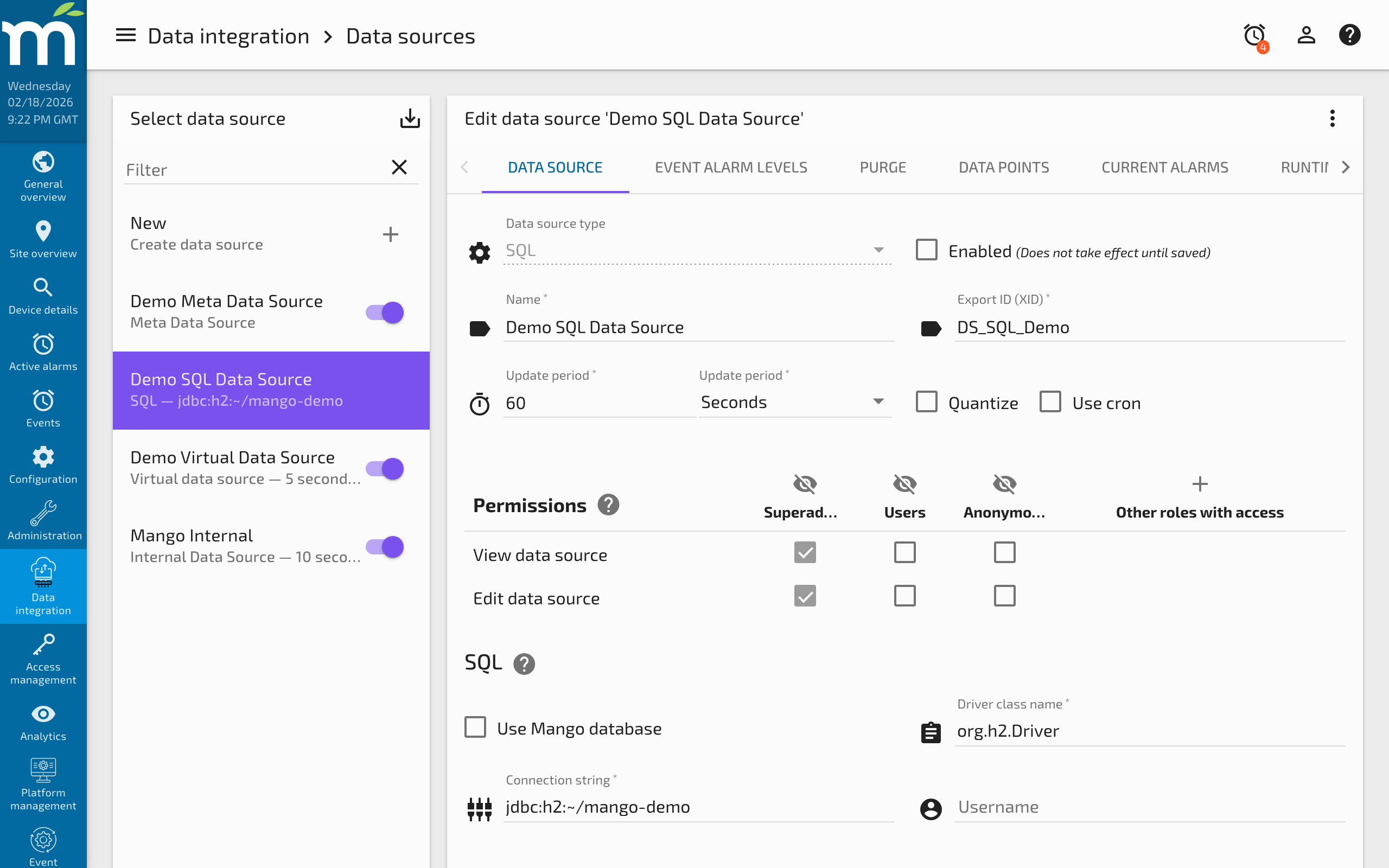
The SQL data source allows Mango to read values from and write values to any SQL database accessible via JDBC. This is a polling data source that executes a SQL SELECT statement at each poll interval, extracts values from the result set, and stores them as Mango data point values. Data points can also be configured with UPDATE or INSERT statements to write values back to the database.
This data source is commonly used to integrate Mango with existing business databases, historian systems, MES (Manufacturing Execution Systems), ERP systems, and any other application that stores data in a relational database.
Overview
| Property | Value |
|---|---|
| Module | mangoAutomation-SqlDS |
| Protocol | JDBC/SQL |
| Direction | Bidirectional |
| Typical Use | Reading from and writing to external databases |
Prerequisites
- A JDBC-compatible database accessible from the Mango server over the network. Supported databases include H2, MySQL/MariaDB, PostgreSQL, Oracle, Microsoft SQL Server, IBM DB2, Sybase, and many others.
- The appropriate JDBC driver JAR file for your database. Drivers for H2 and MySQL are included with Mango. For other databases, obtain the driver from the database vendor and place the JAR file in the SQL Data Source module's
libdirectory. - Database credentials (username and password) with at least SELECT permission on the relevant tables.
- The connection string (JDBC URL) for your database.
Configuration
Data Source Settings
| Setting | Description |
|---|---|
| Name | A descriptive name for the data source. |
| Update period | How often Mango executes the SELECT statement and updates point values. |
| Driver class name | The fully qualified Java class name of the JDBC driver. |
| Connection string | The JDBC URL for connecting to the database. |
| Username | Database login username. |
| Password | Database login password. |
| Select statement | The SQL query to execute on each poll. |
| Row-based query | Whether the query returns data in rows or columns (see below). This setting can only be changed when no data points are defined. |
Common Driver Class Names
| Database | Driver Class Name |
|---|---|
| H2 | org.h2.Driver |
| MySQL / MariaDB | com.mysql.cj.jdbc.Driver |
| Oracle (thin driver) | oracle.jdbc.driver.OracleDriver |
| Microsoft SQL Server | com.microsoft.sqlserver.jdbc.SQLServerDriver |
| PostgreSQL | org.postgresql.Driver |
Common Connection Strings
| Database | Connection String Example |
|---|---|
| H2 (embedded) | jdbc:h2:/path/to/database |
| MySQL | jdbc:mysql://hostname:3306/databasename |
| Oracle | jdbc:oracle:thin:@hostname:1521:SID |
| SQL Server | jdbc:sqlserver://hostname:1433;databaseName=mydb |
| PostgreSQL | jdbc:postgresql://hostname:5432/databasename |
For Mango's own embedded H2 database, the default connection string is jdbc:h2:<Mango_Home>/databases/mah2, which can be found in your Mango configuration file.
Row-Based vs. Column-Based Queries
The SQL data source supports two modes for extracting values from query results:
Row-Based Queries
Row-based queries expect the result set to have a specific structure:
| Column | Content |
|---|---|
| First column | A row identifier string (matched against each data point's row identifier, case-insensitive). |
| Second column | The point value. |
| Third column (optional) | A timestamp override for the point value. If omitted, the poll time is used. If present, it cannot be null. |
Row-based mode is ideal when the query returns many similar values (e.g., all sensor readings from a single table), because each data point simply specifies which row identifier to match.
Example query:
SELECT sensor_name, current_value, last_update FROM sensor_readings WHERE active = 1
This returns rows like:
| sensor_name | current_value | last_update |
|---|---|---|
| temp_zone1 | 72.5 | 2026-02-16 14:30:00 |
| humidity_zone1 | 45.2 | 2026-02-16 14:30:00 |
| pressure_main | 1013.25 | 2026-02-16 14:29:55 |
Each data point specifies a Row identifier (e.g., "temp_zone1") to extract its value from the matching row.
Column-Based Queries
Column-based queries use column names to locate point values. Only the first row of the result set is used. This mode is useful when you need to extract values of different types from a single row.
Example query:
SELECT temperature, humidity, status, last_update FROM current_conditions WHERE location = 'main_building'
Each data point specifies a Column name (e.g., "temperature") to extract its value.
Transposing Row Data to Columns
In some cases, row-based data needs to be queried in column-based mode because the data types are too different. You can transpose the query:
SELECT
  r1.value AS zone1_temp,
  r2.value AS zone1_humidity,
  r3.value AS main_pressure
FROM readings r1, readings r2, readings r3
WHERE r1.sensor_id = 'temp_zone1'
  AND r2.sensor_id = 'humidity_zone1'
  AND r3.sensor_id = 'pressure_main'
This converts row-based data into a single-row, multi-column result that can be used with column-based data points.
Statement Testing
The Statement test section allows you to test both the database connection and the SQL query before enabling the data source. Click Execute to:
- Attempt to connect to the database using the configured driver, connection string, and credentials.
- Execute the SQL SELECT statement.
- Display the results in a format appropriate for the query type:
- Column-based: Lists each column with its name, JDBC data type, and value.
- Row-based: Displays the result set as a table with column headers and up to 50 rows.
Any connection or SQL errors are displayed to help with debugging.
Data Point Configuration
For Row-Based Queries
| Setting | Description |
|---|---|
| Data type | The Mango data type for this point. Values from the result set are automatically converted. |
| Row identifier | The value to match against the first column of the result set. Case-insensitive. |
For Column-Based Queries
| Setting | Description |
|---|---|
| Data type | The Mango data type for this point. |
| Column name | The name of the result set column from which to extract this point's value. |
| Time override column | (Optional) The column name containing a timestamp override for this point's value. Multiple points can share the same time override column. |
Update Statements (Writing Values)
Each data point can optionally define an Update statement that executes when a value is set on the point in Mango. This is a standard SQL UPDATE or INSERT statement. If no update statement is defined, the point is read-only.
Example:
UPDATE thermostat_settings SET setpoint = ? WHERE zone = 'zone1'
The ? placeholder is replaced with the value set on the Mango data point.
Modify Table Only Mode
Points can be configured as Modify Table Only points that execute custom UPDATE or INSERT statements with parameterized values. These points are not polled during normal data source polling -- they only execute when a value is written to them.
The value written to a Modify Table Only point is a formatted string containing the parameters:
(param1, 'string_param', date_param)
Rules:
- Parameters are enclosed in parentheses and separated by commas.
- String parameters must be delimited with single quotes or double quotes.
- Date parameters use the format specified in the Date Format field (a Java SimpleDateFormat pattern).
Bulk operations are possible by including multiple parameter groups:
(1, 'first', 2026-02-16T14:00:00),(2, 'second', 2026-02-16T14:05:00)
Example: Insert Statement
Statement: INSERT INTO events (id, description, event_time) VALUES (?, ?, ?)
Written value: (1001, 'Temperature alarm', 2026-02-16T14:30:00)
Date format: yyyy-MM-dd'T'HH:mm:ss
Example: Update Statement
Statement: UPDATE schedule SET active_date = ? WHERE name = ?
Written value: (2026-03-01T00:00:00, 'Summer Schedule')
Common Patterns
Integrating with an Existing Business Database
Use the SQL data source to pull production metrics, inventory levels, or order counts from an ERP or MES system into Mango dashboards. Set the update period to match how frequently the external system updates its data (e.g., every 5 minutes). This avoids the need for custom API integration and leverages the existing database infrastructure.
Bridging Two Mango Instances
The SQL data source can read point values from another Mango instance's database (if network access is available). This is useful for creating a central monitoring dashboard that aggregates data from multiple remote Mango installations.
Polling Mango's Own Database
You can query Mango's internal H2 database using the SQL data source. This is useful for creating data points that represent derived statistics such as point counts, event counts, or user activity. Use the H2 connection string from your Mango configuration file.
Scheduled Data Ingestion
For data that arrives in a staging table at known intervals, configure the SQL data source update period to match the data arrival schedule. Use a row-based query with timestamp overrides so that each value carries the correct timestamp from the source system rather than the Mango poll time.
Troubleshooting
Connection Failures
- Driver not found -- ensure the JDBC driver JAR file is in the SQL Data Source module's
libdirectory and that the driver class name is correct. Restart Mango after adding a driver JAR. - Connection refused -- verify the database hostname, port, and that the database server allows remote connections.
- Authentication failed -- check the username and password. Some databases require specific permissions for remote access.
- Connection string format -- each database vendor has a specific JDBC URL format. Consult the driver documentation.
Query Errors
- SQL syntax errors -- use the Statement test feature to validate your query before enabling the data source.
- Table or column not found -- verify table and column names. Some databases are case-sensitive.
- Permission denied -- the database user may not have SELECT permission on the required tables.
No Values or Wrong Values
- Row-based: no matching row -- verify the data point's row identifier matches a value in the first column of the result set (case-insensitive).
- Column-based: wrong column -- verify the column name exactly matches the result set column name.
- Data type mismatch -- if the database column contains text but the Mango point is configured as Numeric, conversion will fail.
- Empty result set -- the query may be returning no rows. Test with a broader WHERE clause.
- Timestamp override issues -- if the third column (row-based) or time override column (column-based) contains null values, the data source will raise an error. Ensure timestamp columns are never null when configured.
Performance Concerns
- Slow queries -- optimize your SQL query with appropriate indexes and WHERE clauses. Avoid
SELECT *on large tables. - Connection management -- the SQL data source maintains a single persistent connection, reconnecting only if the connection is found to be closed. If your database enforces idle connection timeouts, ensure the poll period is short enough to keep the connection alive, or that the database is configured to allow reconnection.
- Large result sets -- row-based queries process the entire result set. If the query returns thousands of rows but you only need a few, add a WHERE clause to filter at the database level.
Related Pages
- Data Sources Overview — General data source and data point concepts
- ASCII File Data Source — Another file/data-based source for reading structured text files line by line
- Data File Data Source — Import structured data from XML, CSV, Excel, and binary files
- Data Source Performance — Tuning poll intervals and monitoring for performance issues