Migrating Historical Data to the NoSQL Database
You can migrate historical point values from an H2, MySQL, PostgreSQL, or Microsoft SQL Server database into the Mango NoSQL time-series store. This migration capability also supports importing data from an older Mango M2M database, which is the recommended approach for retaining all historical data when upgrading from Mango M2M to Mango Automation.
The NoSQL migration runs in the background and can take several hours to complete for large datasets. During the migration, Mango continues to collect and store current point values into the NoSQL database, so no data is lost in the process.
Accessing the Migration Tool
Navigate to Administration > Admin home > Utilities > Mango NoSQL to access the migration tools.
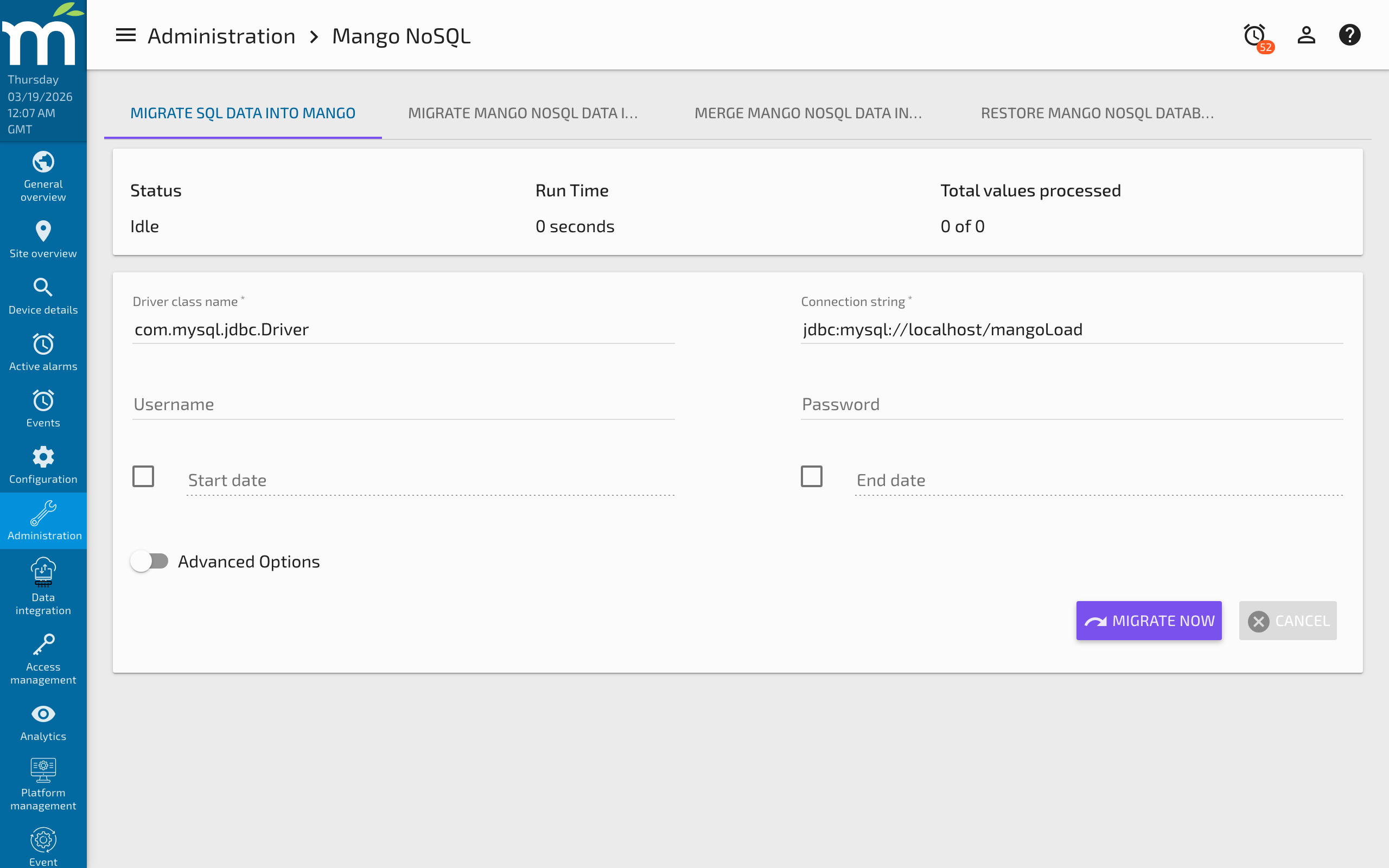
Migrate SQL Data Into Mango
This tool imports data from an external SQL database while Mango is running. It matches data points by XID between the source and target databases -- only points that exist in the current Mango instance and have matching XIDs in the source database will have their data imported.
Driver Class Names
The Driver class name specifies the Java class that implements the JDBC Driver interface for your source database:
| Database | Driver Class Name |
|---|---|
| MySQL | com.mysql.cj.jdbc.Driver |
| H2 | org.h2.Driver |
| PostgreSQL | org.postgresql.Driver |
| Microsoft SQL Server | com.microsoft.sqlserver.jdbc.SQLServerDriver |
Connectivity requires the JDBC driver JAR file to be placed in the SQL data source's lib directory on the Mango server.
Connection Strings
The Connection string depends on the source database type:
- H2:
jdbc:h2:./databases/mah2 - MySQL:
jdbc:mysql://localhost:3306/<your_schema_name>
The Username and Password fields are the database user's login credentials. You can find these in your mango.properties or env.properties file.
Migrate NoSQL Data Into Mango
This utility imports data from both an external SQL database and an external NoSQL database simultaneously. Like the SQL migration, it matches local data point XIDs to the remote database. Only points with matching XIDs will have data imported.
The Mango NoSQL field should point to the root folder of the NoSQL database you are merging from on the Mango server's filesystem.
Merge NoSQL Data Into Mango
This utility merges data from an external Mango NoSQL database without requiring an SQL connection. Provide the Source Mango NoSQL location pointing to the root folder of the external NoSQL database.
Importing data that is timestamped before existing data in the target NoSQL database will be significantly slower than importing data in chronological order. For best performance, import data that extends forward from the existing data.
Advanced Options
These settings control performance and memory usage during large imports involving millions or billions of point values. There is a trade-off between import speed and the impact on Mango's ongoing data collection.
Number of Threads
Defines how many threads are used to concurrently import data. For example, when importing 10 points, Mango can use up to 10 threads. More threads mean faster imports but higher resource consumption, which may affect real-time data collection.
Thread Priority
| Priority | Behavior |
|---|---|
| High | Uses the high-priority thread pool (default max: 100 threads, configurable in System Settings → Threads) |
| Medium | Uses the medium-priority ordered queue (default: 3 threads, configurable in System Settings → Threads) |
| Low | Uses the low-priority queue (default: 1 thread, configurable in System Settings → Threads) |
Maximum Point Value Queue Size
Controls the memory buffer for each import thread. When the source database provides data faster than the NoSQL store can write it, this buffer fills up. Once full, Mango throttles the data retrieval rate to prevent memory exhaustion.
Canceling a Migration
You can stop a running migration by clicking the Cancel button. Cancellation is not immediate -- Mango must contact the source database and request query termination. This works reliably on MySQL but may be slow. Data will stop streaming to Mango immediately (results are discarded), but the query may continue running on the source database for some time.
Important Notes
- Use the Mango 4 migration tool to migrate NoSQL data. Do not directly copy NoSQL database files between installations.
- The migration tools are found under Administration > Mango NoSQL.
- Large migrations should be scheduled during maintenance windows to minimize impact on real-time data collection.
Related Pages
- Enterprise NoSQL Database — Architecture of the target NoSQL time-series store
- Database Conversions — Convert the relational database between H2, MySQL, and Derby
- NoSQL Database Performance Tuning — Tune write-behind settings to handle migration data volumes
- How to Backup Your Mango System — Back up before performing a migration
- Mango Properties Reference — Database connection properties for source and target databases