Project Haystack Data Source
The Project Haystack data source connects Mango to any system that implements the Project Haystack HTTP REST API. Project Haystack is an open-source initiative that standardizes semantic tagging and data modeling for building automation, energy, and IoT systems. By using Haystack's tag-based data model, Mango can discover and read points from diverse building management systems without requiring protocol-specific configuration for each one.
This data source is particularly useful when integrating with Haystack-compatible platforms such as SkySpark, FIN Framework, Niagara (with a Haystack connector), or any other BAS/BMS that exposes a Haystack REST API. Mango queries the remote system's point database using Haystack filter expressions, creates corresponding data points, and polls for updated values on a configurable schedule.
Overview
| Property | Value |
|---|---|
| Module | mangoAutomation-Haystack |
| Protocol | Project Haystack (HTTP REST API) |
| Direction | Polling |
| Typical Use | Integrating with Haystack-compatible BAS/BMS systems for cross-platform data aggregation |
Project Haystack defines a standard vocabulary of tags (e.g., site, equip, point, temp, air, sensor) that describe what data represents rather than how it is communicated. This semantic layer allows Mango to discover points by their meaning ("all temperature sensors on floor 2") rather than by protocol-specific addresses.
Common deployment scenarios include:
- Multi-vendor BAS integration -- aggregating data from multiple Haystack-compatible building systems into a single Mango instance for unified dashboards and analytics.
- SkySpark interoperability -- reading historical and real-time data from SkySpark for visualization in Mango's UI or for triggering Mango-based alarms and automations.
- Campus-wide data collection -- connecting to Niagara stations with Haystack connectors across a campus to create a single pane of glass for facility management.
- Energy analytics -- pulling meter and sub-meter data from Haystack-tagged systems for energy reporting and demand response.
Prerequisites
Before you begin, make sure you have:
- The
mangoAutomation-Haystackmodule installed on your Mango instance.- Network connectivity (HTTP or HTTPS) from the Mango server to the target Haystack server.
- The base URL of the Haystack API endpoint (e.g.,
https://skyspark.example.com/api/demo/).- Valid authentication credentials for the Haystack server (username and password, or API token).
- Familiarity with the Haystack filter syntax for discovering points (see Haystack Filters).
Data source configuration
Creating the data source
- Navigate to Data Sources in the Mango menu.
- Click New and select Haystack from the data source type list.
- Enter a descriptive Name (e.g., "SkySpark Building A").
- Configure the connection and polling settings described below.
- Click Save to create the data source.
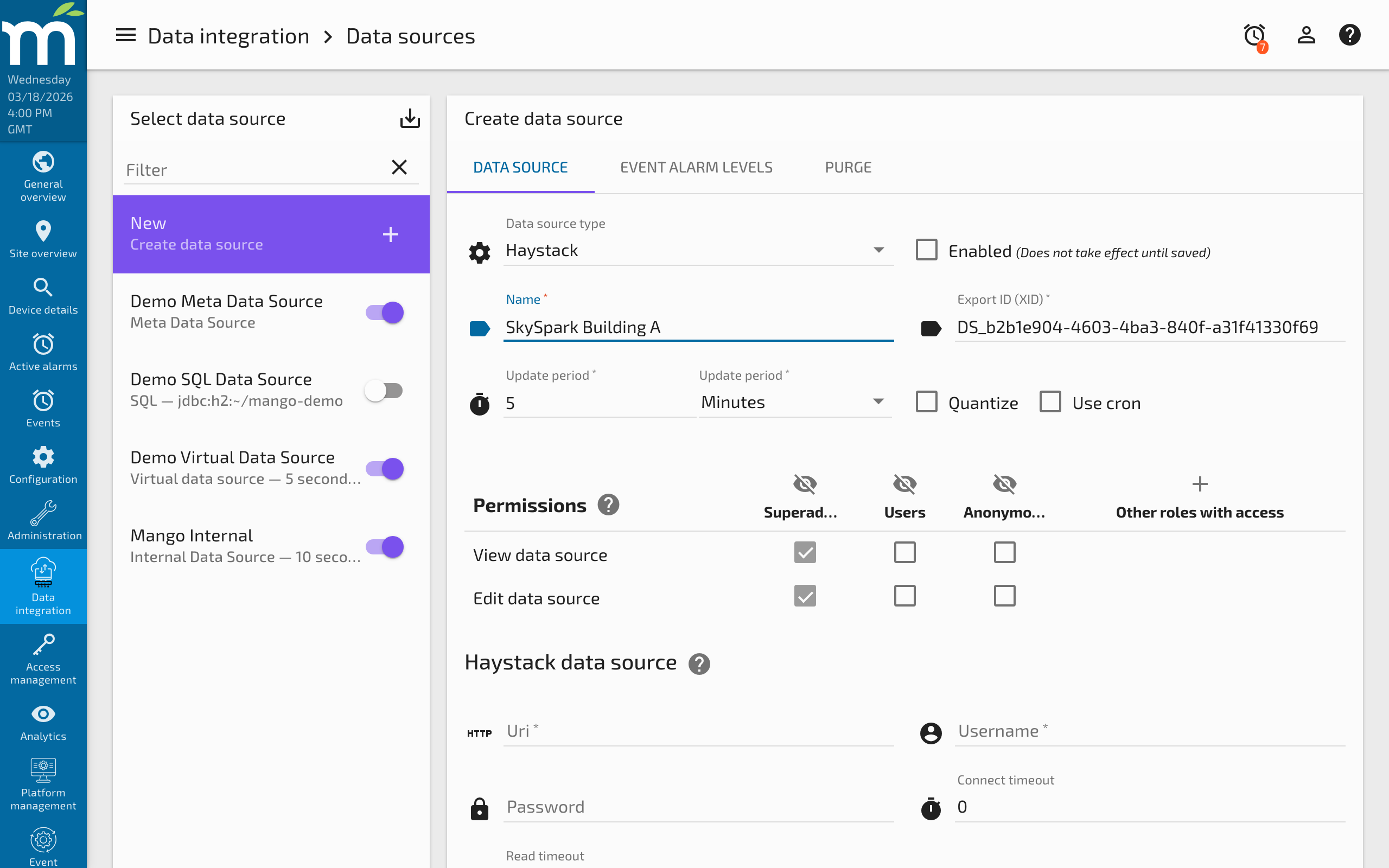
Connection settings
| Parameter | Type | Default | Description |
|---|---|---|---|
uri | String | "" | The base URL of the Haystack REST API. Must end with a trailing slash. Example: https://skyspark.example.com/api/demo/. |
username | String | "" | Username for authenticating with the Haystack server. |
password | String | "" | Password for authenticating with the Haystack server. Stored encrypted in the Mango database. |
connectTimeout | Integer | 0 | Maximum time in milliseconds to wait for a connection to the server. A value of 0 means no timeout (wait indefinitely). |
readTimeout | Integer | 0 | Maximum time in milliseconds to wait for a response from the server after connecting. A value of 0 means no timeout. |
Polling settings
| Parameter | Type | Default | Description |
|---|---|---|---|
updatePeriodType | Enum | MINUTES | Time unit for the polling interval. |
updatePeriods | Integer | 1 | Number of time units between polls. Each poll sends a read request to the Haystack server for all configured points. |
quantize | Boolean | false | Align poll times to period boundaries. |
Testing the connection
After configuring the connection settings, click Test connection to verify that Mango can reach the Haystack server and authenticate successfully. A successful test displays the server's about information, including the Haystack version and project name.
Point configuration
Discovering points
The Haystack data source uses Haystack filter expressions to discover points on the remote server. Filters are powerful query expressions that match records based on their tags.
- With the Haystack data source open, navigate to the Points section.
- Enter a Haystack filter in the discovery field.
- Click Discover points to query the remote server.
- The matching points are displayed with their Haystack tags, names, and current values.
- Select the points you want to add and click Add selected points.
Filter syntax examples
| Filter Expression | Matches |
|---|---|
point | All records tagged as points |
point and temp | All temperature points |
point and temp and air and sensor | Air temperature sensor points |
point and elec and meter | Electrical meter points |
point and siteRef==@site-a | All points belonging to site "site-a" |
point and equipRef==@ahu-1 | All points on equipment "ahu-1" |
point and his | All points with historical data |
point and curVal > 72 | Points with current value above 72 |
Filters support and, or, not, comparison operators (==, !=, <, >, <=, >=), and nested expressions with parentheses. Tag references use the @ prefix for Haystack IDs.
Point settings
| Parameter | Type | Default | Description |
|---|---|---|---|
id | String | "" | The Haystack record ID (@id tag) of the remote point. Automatically populated during discovery. |
dataType | Enum | NUMERIC | The Mango data type for the point. Inferred from the Haystack kind tag during discovery but can be overridden. |
settable | Boolean | false | Whether Mango can write values back to the Haystack server using the pointWrite operation. The remote point must support writes. |
Writing values
For settable points, Mango uses the Haystack pointWrite operation to send values to the remote system. The write includes a priority level that maps to the Haystack 16-level priority array:
| Mango Write Level | Haystack Level | Typical Use |
|---|---|---|
| Default (16) | 16 (default) | Normal operator override |
| Emergency (1) | 1 (life safety) | Emergency overrides |
| Auto (8) | 8 (BAS override) | Automated control logic |
History synchronization
The Haystack data source can import historical data from the remote server using the hisRead operation. This is useful for backfilling data when connecting to an existing Haystack system.
- Select one or more points in the point list.
- Click Import history and specify the date range.
- Mango requests the historical data from the Haystack server and inserts it into the local point value store.
Note that history import is a one-time operation, not continuous synchronization. For ongoing data collection, use the standard polling mechanism with readMode set to CUR_VAL.
Examples
Example 1: Connecting to SkySpark
Integrate Mango with a SkySpark instance to read all AHU supply air temperature points.
- Create a Haystack data source with the SkySpark API URL:
https://skyspark.example.com/api/demo/. - Set authentication to
SCRAMwith valid credentials. - Test the connection to verify connectivity.
- In point discovery, enter the filter:
point and air and temp and supply and sensor. - Click Discover points -- SkySpark returns all matching supply air temperature sensors.
- Select the desired points and click Add selected points.
- Set the polling interval to 1 minute.
- Enable the data source.
Mango now polls SkySpark every minute for the current values of all configured supply air temperature points.
Example 2: Multi-site energy metering
Aggregate electrical meter data from three Niagara stations, each with a Haystack connector.
- Create three Haystack data sources, one per Niagara station.
- For each, enter the Niagara Haystack API URL (e.g.,
https://niagara-bldg-a:443/haystack/). - Discover points using the filter:
point and elec and energy and meter. - Add the energy meter points from each station.
- In Mango, create a calculated point that sums the three meters for a campus total.
Troubleshooting
| Symptom | Cause | Solution |
|---|---|---|
| "Authentication failed" or 401 error | Wrong credentials, wrong auth method, or account locked | Verify username and password. Try switching authMethod between SCRAM and BASIC. Check that the account is not locked on the Haystack server. |
| "Connection refused" or timeout | Server unreachable, wrong URL, firewall blocking | Verify the server URL is correct and accessible from the Mango host. Test with curl or a browser. Check firewall rules. |
| Discovery returns no points | Filter too restrictive, no matching points, or empty project | Broaden the filter (try just point). Verify the Haystack server has data in the target project. Check that the API URL includes the correct project name. |
| "Unknown filter function" or parse error | Invalid filter syntax | Review the Haystack filter reference. Ensure tag names are spelled correctly and operators are valid. Use parentheses to clarify complex expressions. |
| Points discovered but values are null | Point has no current value (curVal) on the server | Check if the point has a current value on the Haystack server. Verify the Haystack server is actively updating the point's current value. |
| SSL certificate errors | Self-signed or untrusted certificate on Haystack server | Import the server's CA certificate into the Mango JVM truststore using keytool. Or configure Mango's mango.properties to trust the certificate. |
| Write operations fail | Remote point not writable, wrong priority level, or permission denied | Verify the point supports writes on the Haystack server. Check that the authenticated user has write permissions. |
| Slow polling with many points | Large number of points read individually | Batch reads are used automatically, but very large point counts (1000+) may still be slow. Increase the polling interval or split points across multiple data sources. |
Related Pages
- Data Sources Overview — General data source and data point concepts
- BACnet Data Source — Direct BACnet integration without the Haystack abstraction layer
- OPC UA Data Source — Alternative for connecting to OPC UA-compatible building systems
- Data Source Performance — Tuning poll intervals for HTTP-based data collection