Global Scripts
Global scripts allow you to define reusable JavaScript functions and initializations in a single place that are automatically included in every script context -- meta data points, scripting data sources, point links, event handlers, and anywhere else that scripts are used. This eliminates code duplication and simplifies maintenance when the same logic is needed across multiple scripts.
How Global Scripts Work
- Multiple scripts can be created. Each global script is saved with a name, and scripts are applied in alphabetical order by their names at runtime.
- A single script can contain an arbitrary number of function declarations, variable definitions, and other initializations.
- Scripts must be independently executable. A global script cannot reference variables or functions defined in other global scripts. Each script is evaluated on its own before being merged into the execution context.
- Changes require restarts. Modifying an existing global script does not automatically update running scripting data sources or meta data sources. You must restart those data sources to pick up the changes. Point links, however, will pick up global script changes the next time they execute.
Creating a Global Script
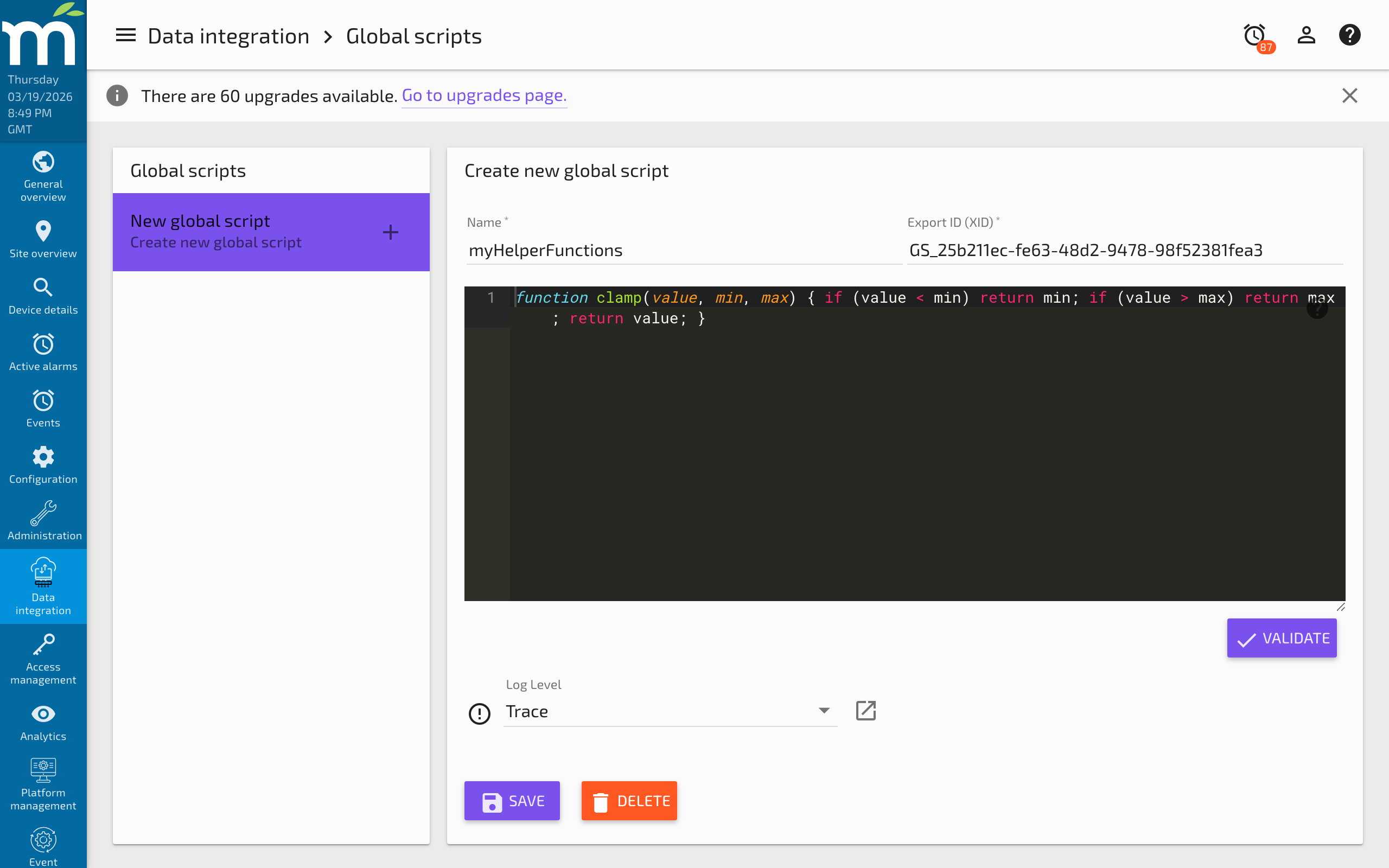
- Navigate to Administration > Global Scripts (provided by the SST Global Scripts module).
- Click New to create a new script.
- Enter a Name for the script. Choose a descriptive name since the alphabetical ordering of names determines the execution order.
- Write your JavaScript code in the editor.
- Click Save.
Script Language
Scripts are written in JavaScript (ECMAScript). The execution environment uses the Rhino engine (or GraalJS in newer versions). Standard ECMAScript features are available, but browser-specific objects (window, document, etc.) are not present.
Simple Global Script Examples
Example 1: Multiplication Helper
This script, named "myProduct," takes two arguments, multiplies them, and returns the product.
function myProduct(arg1, arg2) {
    return arg1 * arg2;
}
You can then call myProduct(sensorA.value, calibration.value) from any meta data point or scripting data source script.
Example 2: Fahrenheit to Celsius Conversion
This script, named "myConvertFtoC," converts a temperature from Fahrenheit to Celsius.
function myConvertFtoC(arg1) {
    return (arg1 - 32) * (5 / 9);
}
Usage in a meta data point script:
return myConvertFtoC(tempSensor.value);
Example 3: Celsius to Fahrenheit Conversion
function myConvertCtoF(arg1) {
    return arg1 * (9 / 5) + 32;
}
Example 4: Clamping a Value to a Range
function clamp(value, min, max) {
    if (value < min) return min;
    if (value > max) return max;
    return value;
}
Example 5: Moving Average Helper
function movingAverage(pointVar, count) {
    var values = pointVar.last(count);
    if (values.size() === 0) return 0;
    var sum = 0;
    for (var i = 0; i < values.size(); i++) {
        sum += values.get(i).value;
    }
    return sum / values.size();
}
Usage:
return movingAverage(temperature, 10);
Built-in Global Functions
The SST Global Scripts module (if installed) provides several pre-defined functions that are available in all script contexts:
| Function | Description |
|---|---|
max(a, b, c, ...) | Returns the maximum of all provided values |
min(a, b, c, ...) | Returns the minimum of all provided values |
avg(a, b, c, ...) | Returns the average of all provided values |
sum(a, b, c, ...) | Returns the sum of all provided values |
These accept any number of arguments and work with raw numeric values (not Point Value Time objects). To use them with point variables, pass .value:
return max(sensor1.value, sensor2.value, sensor3.value);
Best Practices
- Use descriptive function names prefixed with a project or team identifier to avoid naming collisions (e.g.,
hvac_calculateSetpoint()rather thancalc()). - Keep global scripts focused. Rather than putting all functions in one massive script, organize related functions into separate named scripts (e.g., "HVAC_Calculations," "Unit_Conversions," "Alarm_Helpers").
- Test changes carefully. Since global scripts affect all running scripts, a syntax error in a global script can break many meta points and scripting data sources simultaneously.
- Restart data sources after changes. Remember that running meta and scripting data sources do not pick up global script changes until restarted. Plan your rollout accordingly.
- Do not store state in global variables. While global variables technically persist within a single script engine instance, they are not shared between different meta points or data sources. Use data points to store persistent state instead.
Related Pages
- Scripting Overview — Introduction to meta data points and scripting data sources that use global scripts
- About Mango JavaScript — Point Value Time objects, special variables, and the scripting API
- Script Examples — Practical examples that demonstrate using global functions in scripts
- Meta Data Source — Configure the meta data source that executes scripts with global script access