Audit Trail
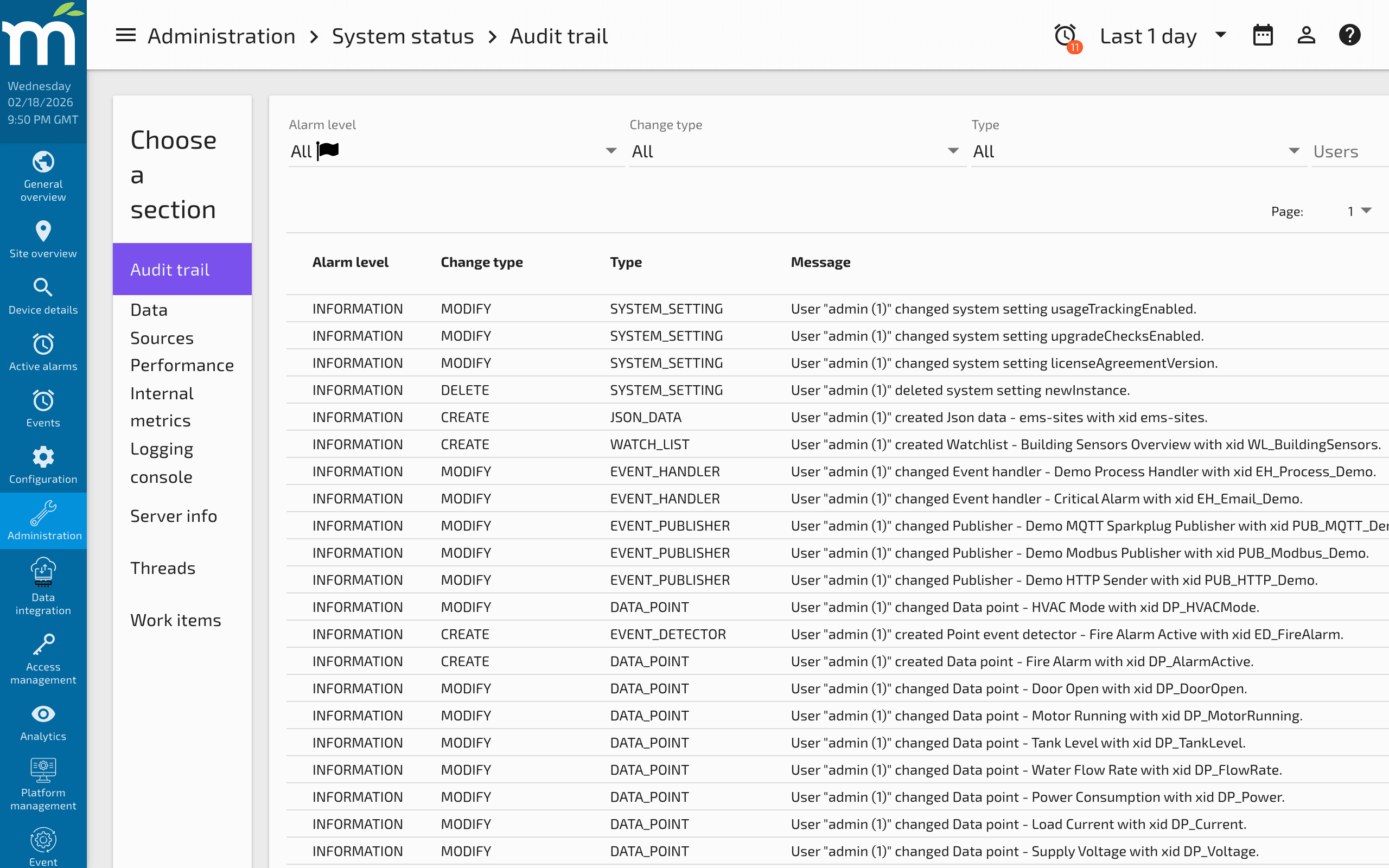
The Audit Trail (Administration > System Status > Audit Trail) records all configuration changes made to the Mango system. Every time a data source, data point, user, event handler, or other configuration object is created, modified, or deleted, an audit event is generated with the full details of the change, including who made it and when.
Viewing Audit Events
The audit trail displays a table of audit events that can be sorted and filtered by:
| Filter | Description |
|---|---|
| Alarm Level | The severity level assigned to the audit event type |
| Change Type | The type of change: CREATE, UPDATE, or DELETE |
| Event Type | The category of object that was changed (data source, data point, user, etc.) |
| User | The user who made the change |
| Time | When the change occurred |
Date Filtering
Enable the Date filter to limit the audit events shown to those created within the time range selected in the Date Bar. This is useful for narrowing down changes made during a specific incident or maintenance window.
Viewing Change Details
Click any row in the audit trail table to select that event and view its full context as JSON in a popup dialog. The JSON output contains the complete state of the object at the time of the change, including all properties and their values.
This is particularly useful for:
- Identifying what changed -- Compare the JSON from a CREATE or UPDATE event with the current configuration to see what was modified.
- Determining who made a change -- The audit event records the user who performed the action.
- Recovering from mistakes -- The JSON data can be used to restore a previous configuration.
Restoring Data from the Audit Trail
If a configuration change needs to be reversed, you can restore the previous state by importing the audit trail JSON through the Configuration Import/Export page.
Step 1: Export Current Configuration
First, export the current configuration of the object type you want to restore. This gives you the correct JSON structure. For example, exporting JSON data stores might produce:
{
  "jsonData": [
    {
      "xid": "mangoUI-menu",
      "jsonData": "{\"menuItems\":[{\"menuHidden\":false,\"name\":\"ui.docs\"}]}",
      "readPermission": [["user"]],
      "name": "UI Menu",
      "editPermission": []
    }
  ]
}
Step 2: Replace with Audit Trail Data
Copy the JSON from the audit trail event that contains the state you want to restore. Update only the properties you want to revert, keeping the JSON structure consistent with what the import expects.
Step 3: Import
Paste the modified JSON into the Configuration Import/Export page and import it. Mango will update the object to match the imported configuration.
Audit Event Types
Mango generates audit events for changes to the following object types:
| Object Type | Events Tracked |
|---|---|
| Data Sources | Create, update, delete, enable/disable |
| Data Points | Create, update, delete, enable/disable |
| Event Detectors | Create, update, delete |
| Event Handlers | Create, update, delete |
| Users | Create, update, delete, permission changes |
| System Settings | Any setting change |
| JSON Data Stores | Create, update, delete |
| Publishers | Create, update, delete |
| Mailing Lists | Create, update, delete |
Audit Trail Retention
Audit events are stored in the SQL database and are subject to the system-level event purge settings configured under System Settings > Purge Settings. If you need to retain audit records for compliance purposes, ensure your purge settings accommodate your retention requirements.
On systems with frequent configuration changes, the audit trail can contribute to database growth. Monitor the events table size using the SQL Console if needed.
Best Practices
- Review the audit trail after unexpected behavior -- If a data source suddenly stops working or event detectors change behavior, the audit trail can reveal if a configuration change was the cause.
- Use the audit trail for compliance -- In regulated environments, the audit trail provides an immutable record of who changed what and when.
- Export audit data regularly -- For long-term audit retention, periodically export the relevant audit events to external storage before they are purged.
Related Pages
- Using the SQL Console — Query the events table to check audit trail size and purge old entries
- Users and Permissions — Understand which users can make configuration changes tracked by the audit trail
- Managing Disk Space — Monitor events table growth from audit records
- Work Items — Audit events are processed as medium-priority work items