SNMP Data Source
The SNMP (Simple Network Management Protocol) data source allows Mango to collect data from any device that implements the SNMP protocol. SNMP is the standard management protocol for network infrastructure such as switches, routers, UPS systems, printers, and many industrial devices. Mango supports SNMPv1, SNMPv2c, and SNMPv3, including both polling and trap reception.
This data source performs periodic GET requests to retrieve OID (Object Identifier) values from devices, and can also listen for asynchronous SNMP trap messages that devices send when events occur.
Overview
| Property | Value |
|---|---|
| Module | mangoAutomation-SNMP |
| Protocol | SNMP v1/v2c/v3 |
| Direction | Polling + Trap reception |
| Typical Use | Network device monitoring (switches, routers, UPS) |
Prerequisites
- Network access to the SNMP-enabled device on the appropriate port (default: UDP 161 for queries, UDP 162 for traps).
- The device's MIB file (Management Information Base), which documents the available OIDs and their meanings. While not strictly required, MIB files make it much easier to find and understand the data points available on a device.
- For SNMPv1/v2c: the community string (acts as a password, default is often "public" for read and "private" for write).
- For SNMPv3: the Engine ID, username, and authentication/privacy credentials.
Configuration
Data Source Settings
Every data source requires a Name, which can be any description.
| Setting | Description |
|---|---|
| Update period | How often Mango polls the SNMP device for data. |
| Host | IP address or hostname of the SNMP device. |
| Port | UDP port for SNMP queries (default: 161). |
| SNMP version | v1, v2c, or v3. Determines which authentication fields are shown. |
| Timeout | Milliseconds to wait for a response (default: 1000 ms). |
| Retries | Number of retry attempts for failed requests (default: 2). |
| Maximum vars per request | Controls request partitioning. A value greater than 0 splits requests into groups of this size. A value of 0 sends all OIDs in a single request. |
SNMPv1 / v2c Authentication
SNMPv1 and v2c use community strings as passwords. Typically there is a read-only community string (often "public") and a read-write community string (often "private"). Mango sends the write community string when setting point values and the read community string during normal polling.
SNMPv3 Authentication
SNMPv3 provides stronger security with user-based authentication and optional encryption.
| Setting | Description |
|---|---|
| Engine ID | The SNMP engine identifier. Must be 5 to 32 bytes, entered as hex starting with 0x. |
| Context engine ID | Usually the same as the Engine ID unless the device uses a separate context engine. |
| Context name | The SNMP context name. Leave empty unless the device requires a specific context (default: empty). |
| Security name | The SNMPv3 username. |
| Auth protocol | Authentication protocol (e.g., MD5, SHA). |
| Auth passphrase | Password for authentication. |
| Privacy protocol | Encryption protocol (e.g., DES, AES128). |
| Privacy passphrase | Password for encryption. |
Valid hex format for Engine IDs: 0x80:00:00:09:03:dc:ce:c1:ff:c9:dc (colon-separated).
Host Testing
Before adding data points, use the Host test section to verify connectivity and check individual OID values. Enter an OID and click "Get OID value" to send a single SNMP GET request using the current configuration settings. If successful, the value is displayed. If not, an error message describes the problem (e.g., timeout, authentication failure, or unknown OID).
Data Point Configuration
| Setting | Description |
|---|---|
| OID | The Object Identifier to request from the device (for polling) or to match in incoming traps. Example: 1.3.6.1.2.1.1.3.0 (system uptime). |
| Data type | The Mango data type for the point: Numeric, Binary, Multistate, or Alphanumeric. Values are automatically converted. |
| Binary 0 value | For binary points, the SNMP value that should be interpreted as 0 (false). All other values will be true. |
| Set type | The SNMP data type to use when writing values back to the device. Select "(not settable)" for read-only points. |
| Polling | Whether to include this OID in regular GET requests, or only receive values via traps. |
| Multiplicand / Augend | For numeric points, a linear transformation: displayed = (raw * multiplicand) + augend. |
SNMP Network Discovery
Mango includes a built-in SNMP import tool that can scan networks and automatically discover SNMP devices and their available data points.
Using the SNMP Import Tool
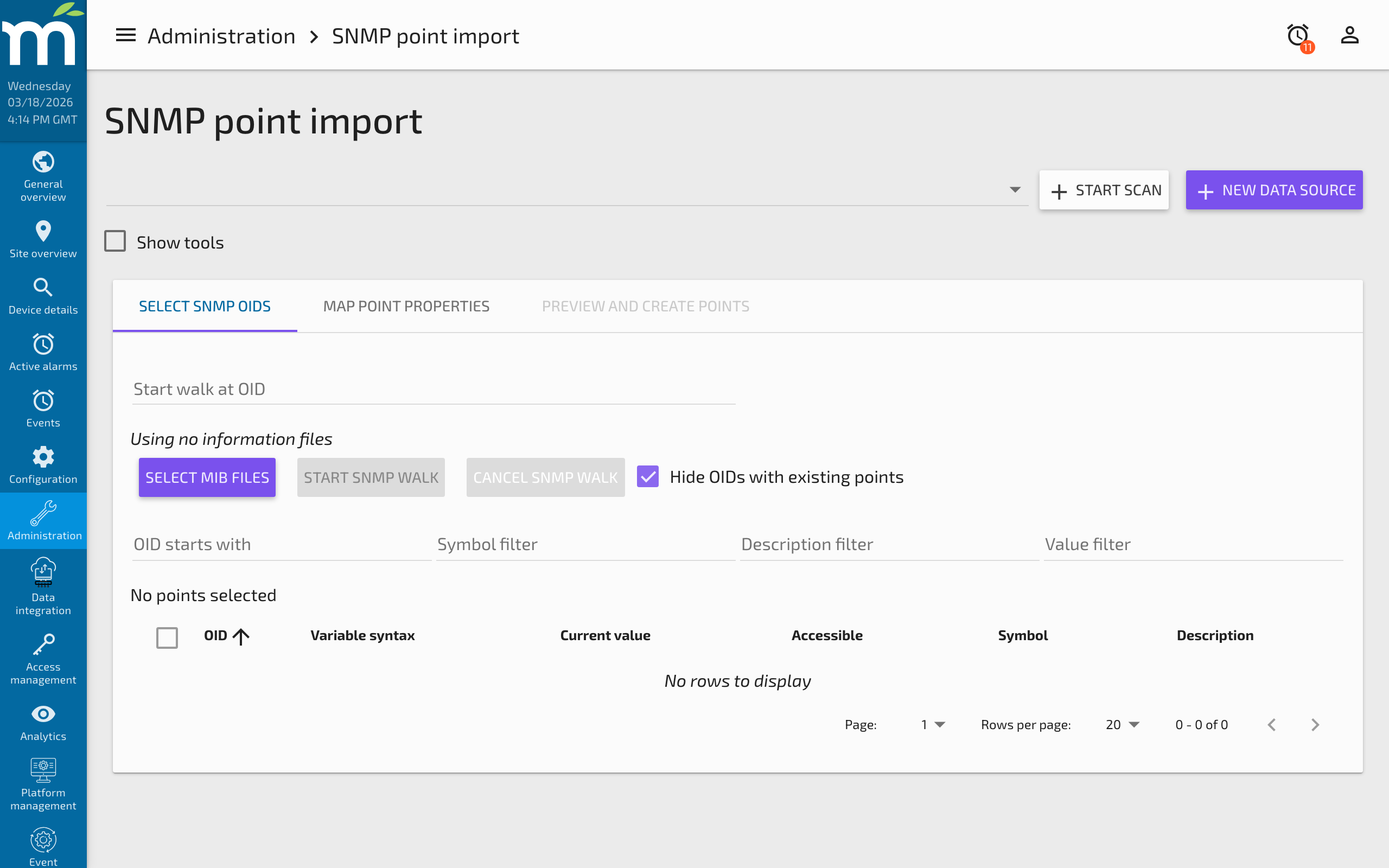
- Navigate to Administration > Admin Home > Utilities and open the SNMP Import tool.
-
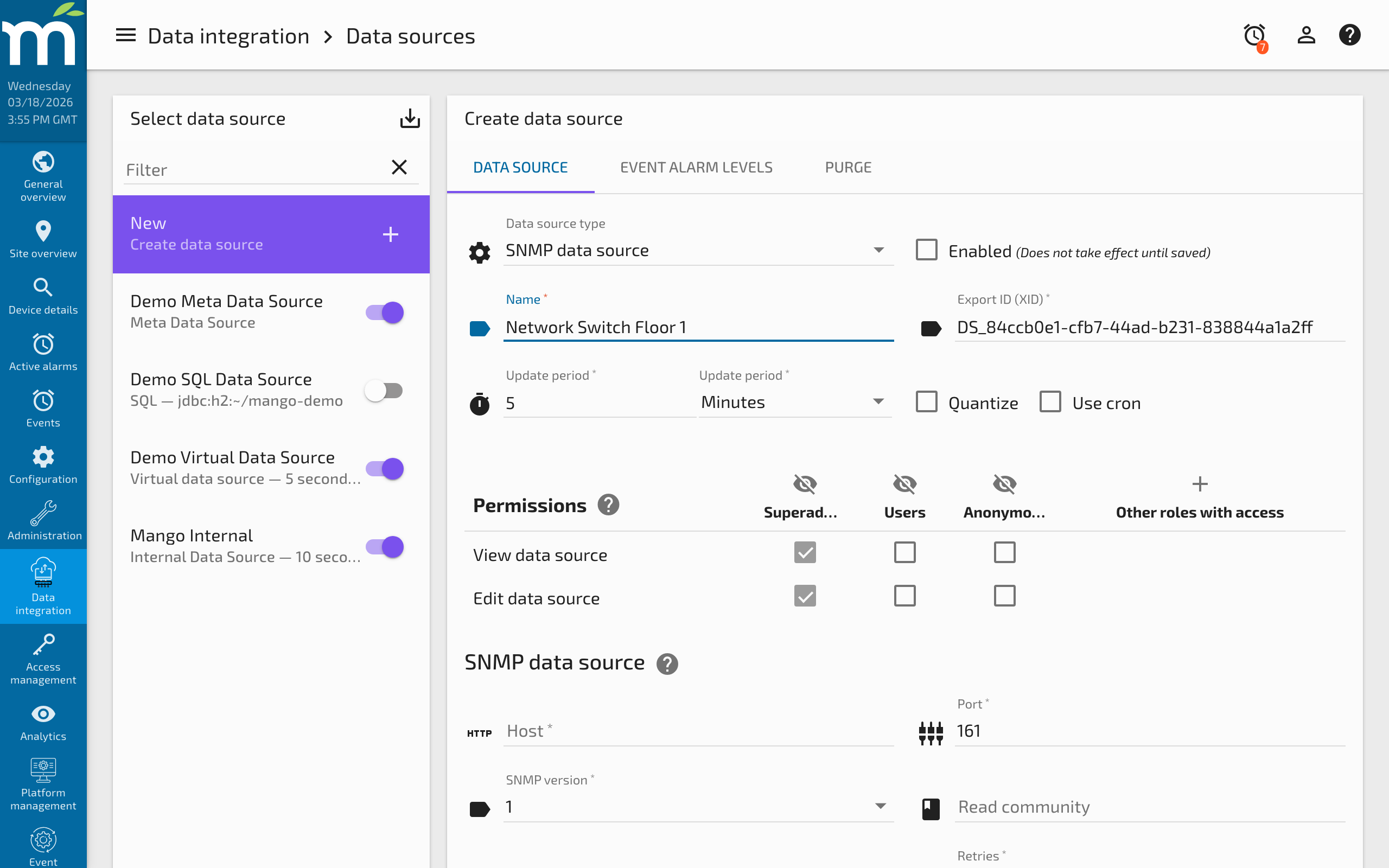
Click + NEW DATA SOURCE to create a data source for the device you want to scan.
-
Enter the scan settings including the device IP address, SNMP version, and community string. Click the scan button to discover the device.
-
Return to the SNMP Point Import tool and select the device from the data source list. If you have a MIB file, upload it to help Mango interpret the discovered OIDs. Click START SNMP WALK to enumerate all available OIDs on the device.
-
Select the data points you want to add and switch to the PREVIEW AND CREATE POINTS tab. Click CREATE MANGO POINTS to add them to your data source.
After the points are added, you can use the Bulk Editor to modify point settings such as names, logging intervals, and text renderers.
Common Patterns
Monitoring Network Switches
A typical use case is monitoring switch port status, traffic counters, and error rates. Use the IF-MIB (interface MIB) OIDs:
1.3.6.1.2.1.2.2.1.8.X-- Interface operational status (up/down) for port X1.3.6.1.2.1.2.2.1.10.X-- Inbound octets (bytes received) for port X1.3.6.1.2.1.2.2.1.16.X-- Outbound octets (bytes sent) for port X1.3.6.1.2.1.2.2.1.14.X-- Inbound errors for port X
UPS Monitoring
Many UPS systems support the UPS-MIB. Common OIDs include:
1.3.6.1.2.1.33.1.2.1.0-- Battery status1.3.6.1.2.1.33.1.2.7.0-- Battery charge remaining (%)1.3.6.1.2.1.33.1.3.3.1.3.1-- Input voltage1.3.6.1.2.1.33.1.4.4.1.2.1-- Output power
Receiving SNMP Traps
To receive trap notifications, create data points with Polling set to "Trap only" and set the OID to match the expected trap OID. Configure the device to send traps to the Mango server's IP address on port 162. Mango will update the point value each time a matching trap is received.
Troubleshooting
Timeout Errors
If host testing or polling results in timeouts:
- Verify network connectivity -- confirm you can reach the device (ping, traceroute).
- Check the community string -- an incorrect community string will cause the device to silently ignore the request, appearing as a timeout.
- Verify the SNMP version -- some devices only support v2c or v3.
- Check firewall rules -- ensure UDP port 161 is open between Mango and the device.
- Try a standalone SNMP tool -- use
snmpgetorsnmpwalkfrom the command line to isolate whether the problem is with Mango configuration or network access.
No Values Returned
If the host test succeeds but data points show no values:
- Verify the OID -- ensure it exactly matches the device's MIB, including the trailing instance identifier (e.g.,
.0for scalar values). - Check the data type -- a mismatch between the Mango data type and the actual SNMP value type can cause conversion failures.
- Check the polling setting -- ensure the point is set to poll (not trap-only) if you expect regular updates.
SNMPv3 Authentication Failures
- Verify the Engine ID is correct and properly formatted as hex with
0xprefix. - Ensure the security name, auth protocol, and auth passphrase exactly match the device configuration.
- If using privacy (encryption), verify the privacy protocol and privacy passphrase as well.
- Some devices require the context engine ID to be set separately from the engine ID.
Related Pages
- Data Sources Overview — General data source and data point concepts
- Modbus Data Source — Another widely used polling protocol for industrial devices
- Data Source Performance — Tuning poll periods and monitoring for aborted polls
- BACnet Data Source — Building automation protocol with similar network device discovery features