BACnet Publisher
The BACnet publisher exposes Mango data point values as BACnet objects on the network. This allows other BACnet-capable devices and systems -- building management systems (BMS), building automation controllers (BACs), operator workstations, and supervisory platforms -- to discover and read Mango data as if it were a native BACnet device. Mango acts as a BACnet server, presenting a local BACnet device with configurable objects that mirror the current values of selected Mango data points.
Where the BACnet data source reads data from external BACnet devices into Mango, the BACnet publisher does the reverse: it makes Mango data available to the BACnet network. This is essential for integrating Mango into existing BACnet-based building automation infrastructures where other systems need access to Mango's aggregated, calculated, or transformed data.
Overview
The BACnet publisher creates a virtual BACnet device on the local network. Each published Mango data point is mapped to a BACnet object (such as an Analog Value, Binary Value, or Multistate Value). Other BACnet devices can then discover this virtual device via Who-Is/I-Am services and read object values using standard BACnet Read Property requests. The publisher also supports Change of Value (COV) notifications, where subscribed clients receive automatic updates when values change.
Key capabilities:
- Virtual BACnet device -- Mango appears as a standard BACnet device on the network with a configurable device ID, name, and description.
- Object type mapping -- Mango points are automatically mapped to appropriate BACnet object types based on their data type (numeric, binary, multistate, alphanumeric).
- COV support -- clients can subscribe to COV notifications for real-time updates without polling.
- BACnet/IP and BACnet/MSTP -- supports both IP-based and serial (MSTP) network connections.
- Read and write -- external systems can both read values from and write values to Mango through the published BACnet objects.
Prerequisites
Before you begin, make sure you have:
- The BACnet module installed on your Mango instance (the same module that provides the BACnet data source also provides the publisher).
- A unique BACnet device instance number that does not conflict with any other device on the BACnet network.
- Network connectivity: for BACnet/IP, the Mango host must be on the same IP subnet as the BACnet network (or routable through a BBMD). For BACnet/MSTP, a serial connection to the MSTP trunk.
- Knowledge of the BACnet network number and any BBMD configuration required for cross-subnet communication.
- The Mango data points you want to publish must already exist and be receiving values.
Step-by-step guide
Step 1: Configure the local BACnet device
Before creating the publisher, configure Mango's local BACnet device identity. This is the BACnet device that other systems will discover on the network.
- Navigate to Administration > Publishers.
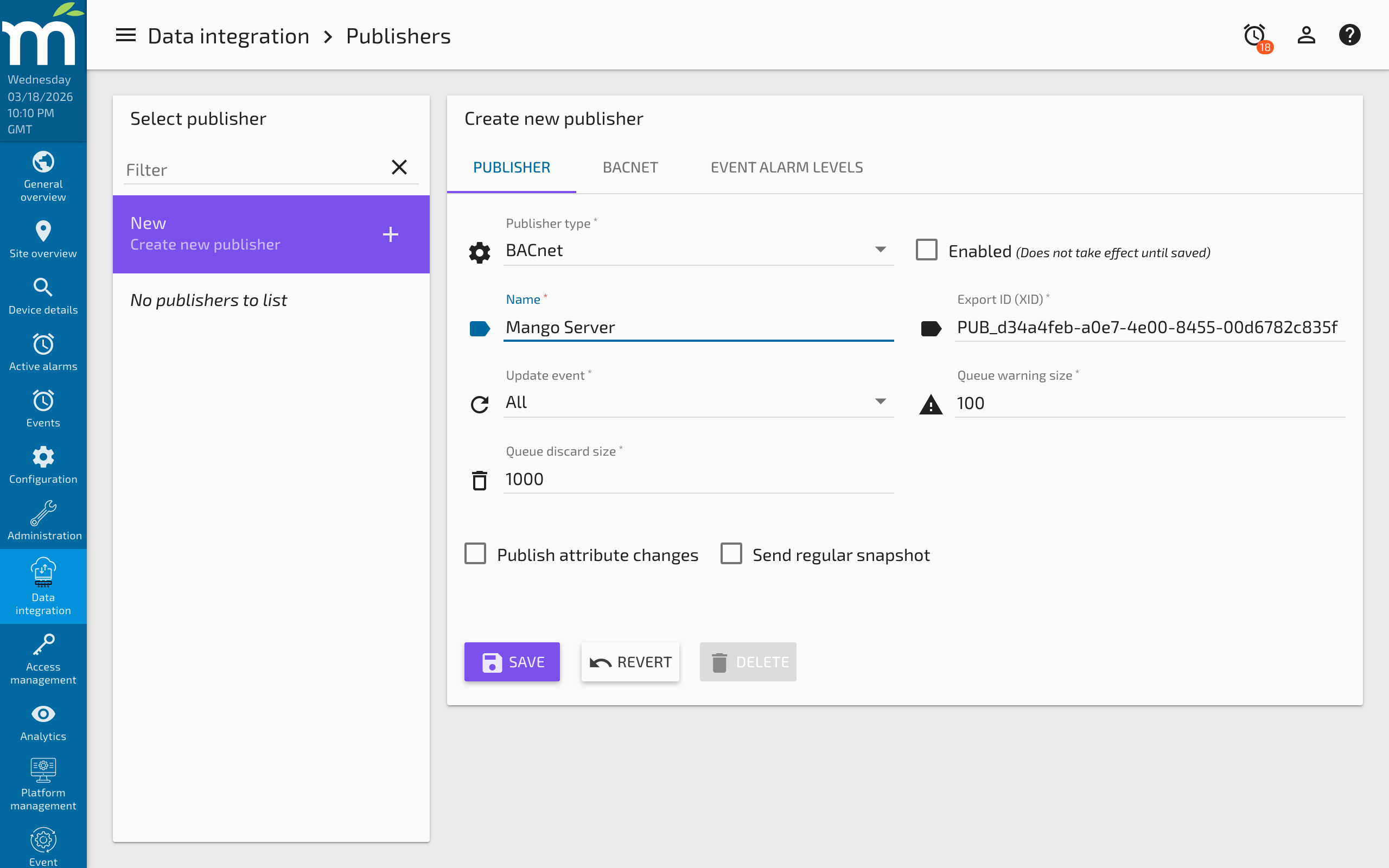
- Click New and select BACnet from the publisher type dropdown.
- Configure the local device settings:
| Setting | Description |
|---|---|
| Device instance | A unique BACnet device instance number (0-4194302). This must not conflict with any other BACnet device on the network. |
| Device name | A human-readable name for the BACnet device (e.g., "Mango-Server-01"). Visible during BACnet discovery. |
| Network type | BACnet/IP for Ethernet/IP networks or BACnet/MSTP for serial trunk connections. |
Step 2: Configure the network connection
For BACnet/IP:
| Setting | Type | Default | Description |
|---|---|---|---|
| Bind address | String | 0.0.0.0 | The local IP address to bind to. Use 0.0.0.0 to listen on all interfaces, or specify a specific interface address. |
| Port | Integer | 47808 | The BACnet/IP UDP port (standard: 47808 / 0xBAC0). |
| Broadcast address | String | 255.255.255.255 | The broadcast address for the local subnet. Used for Who-Is/I-Am discovery. |
| BBMD address | String | "" | (Optional) IP address of a BACnet Broadcast Management Device for cross-subnet communication. Leave empty if Mango is on the same subnet as all clients. |
| BBMD port | Integer | 47808 | Port of the BBMD, if configured. |
For BACnet/MSTP:
| Setting | Type | Default | Description |
|---|---|---|---|
| Comm port | String | "" | Serial port connected to the MSTP trunk (e.g., /dev/ttyUSB0). |
| Baud rate | Integer | 9600 | MSTP bus speed. Must match all other devices on the trunk. |
| MAC address | Integer | 1 | The MSTP MAC address for this device (0-127). Must be unique on the trunk. |
| Max master | Integer | 127 | The highest MAC address to poll during token passing. Set to the highest MAC address on the trunk for efficiency. |
| Max info frames | Integer | 1 | Maximum number of information frames to send before passing the token. |
Step 3: Configure common publisher settings
| Setting | Description |
|---|---|
| Update event | When to update BACnet object values: All (every update), Changes only (only when value changes), Logged only (when logged), or None (snapshots only). For COV to work correctly, use Changes only or All. |
| Cache warning size | Raises a warning alarm when the internal queue exceeds this number of entries. |
| Cache discard size | Discards the oldest entries when the queue reaches this size. |
Step 4: Add published points
For each Mango data point you want to expose as a BACnet object:
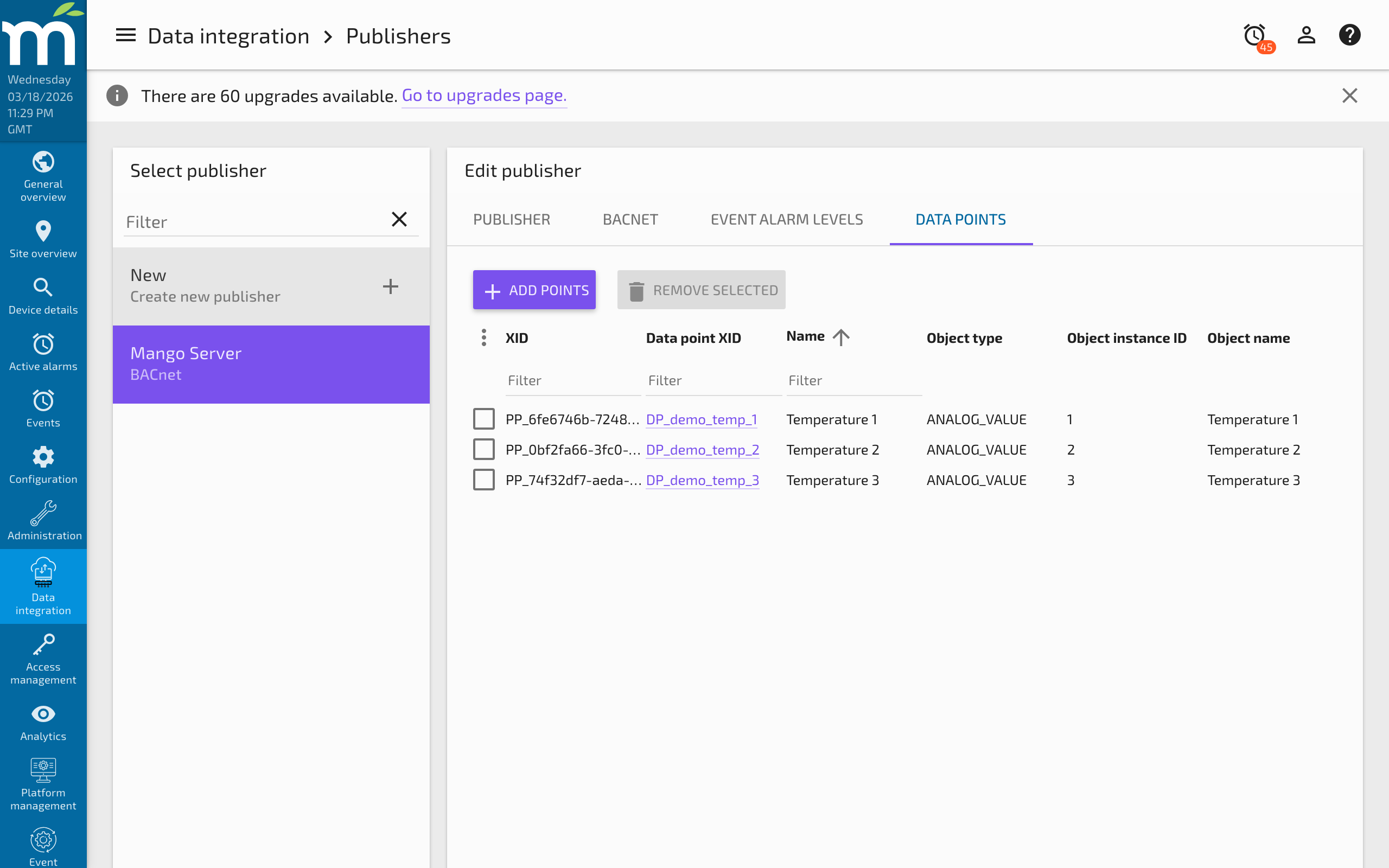
- Click Add point in the published points section.
- Select the Mango data point to publish.
- Configure the BACnet object mapping:
| Setting | Type | Default | Description |
|---|---|---|---|
| Object type | Enum | Auto | The BACnet object type. Auto-selected based on the Mango data type but can be overridden. |
| Object instance | Integer | Auto | The BACnet object instance number. Must be unique within each object type on this device. Auto-assigned sequentially but can be set manually. |
| Object name | String | Point name | The BACnet object name. Defaults to the Mango point name. Must be unique across all objects on this device. |
| COV increment | Numeric | 0.0 | For numeric objects, the minimum value change that triggers a COV notification. Set to 0 to notify on every change. |
| Description | String | "" | Optional description for the BACnet object. |
Automatic object type mapping
| Mango Data Type | Default BACnet Object Type | Alternative Object Types |
|---|---|---|
| Numeric | Analog Value (AV) | Analog Input (AI), Analog Output (AO) |
| Binary | Binary Value (BV) | Binary Input (BI), Binary Output (BO) |
| Multistate | Multistate Value (MV) | Multistate Input (MI), Multistate Output (MO) |
| Alphanumeric | Character String Value | -- |
Input vs. Value vs. Output: In BACnet, the distinction matters for how other systems interpret the object. Use Input types when the value represents a physical sensor reading. Use Value types when the value is calculated or derived. Use Output types when the value represents a controllable setpoint and you want external systems to write to it.
Step 5: Enable and verify
- Click Save to save the publisher configuration.
- Toggle Enabled to start the BACnet device.
- From another BACnet device or a BACnet exploration tool (such as YABE, VTS, or a BMS workstation), send a Who-Is request.
- Verify that Mango's BACnet device responds with an I-Am containing the configured device instance number.
- Browse the device's object list and verify that the published objects are present with current values.
Key concepts
COV notifications
Change of Value (COV) notifications allow BACnet clients to subscribe to specific objects and receive automatic updates when values change. This is more efficient than polling, especially for values that change infrequently.
When a BACnet client subscribes to a COV on one of Mango's published objects:
- Mango acknowledges the subscription.
- Whenever the Mango point value changes (by more than the COV increment for numeric points), Mango sends a COV notification to the subscribed client.
- Subscriptions have a configurable lifetime. The client must renew the subscription before it expires.
Network visibility and BBMD
On a single IP subnet, BACnet/IP discovery works via broadcast. If the BACnet network spans multiple subnets, a BACnet Broadcast Management Device (BBMD) is required to forward discovery messages between subnets. Configure the BBMD address in the publisher settings and register Mango as a Foreign Device at the BBMD.
Priority array
When external BACnet systems write values to Mango's published objects, the writes include a BACnet priority level (1-16). Mango processes these writes and updates the corresponding Mango data point value. The BACnet priority array is maintained per object, with Level 1 (Manual Life Safety) being the highest priority.
Troubleshooting
| Symptom | Cause | Solution |
|---|---|---|
| Device not visible on network (no I-Am response) | Wrong network configuration, firewall blocking UDP 47808, port already in use | Verify the bind address and port. Check that UDP port 47808 is not blocked by a firewall or used by another BACnet application. Use a packet capture to verify broadcast traffic. |
| Device discovered but objects missing | Points not added to publisher, publisher not enabled, update event set to None | Verify that points are configured in the publisher and the publisher is enabled. Ensure update event is not set to None (which only sends snapshots). |
| Wrong object type reported | Auto-mapping chose incorrect type | Override the object type in the point configuration. For example, change from Analog Value to Analog Input if the BMS expects input objects for sensor data. |
| Object values stale or not updating | Update event misconfigured, Mango point not receiving values | Check that the source data point is active and receiving updates. Verify the update event setting. Check the publisher queue -- a growing queue indicates delivery problems. |
| COV notifications not received | Client subscription expired, COV increment too large | Verify the client is renewing its subscription before the lifetime expires. For numeric objects, check that the COV increment is not set too high (a value change smaller than the increment will not trigger a notification). |
| "Address already in use" error on startup | Another BACnet application or Mango instance using the same port | Change the BACnet/IP port or stop the conflicting application. Only one BACnet/IP device can bind to a given port on the same interface. |
| MSTP communication errors | Wrong baud rate, MAC address conflict, wiring issue | Verify baud rate matches all devices on the trunk. Ensure the MAC address is unique. Check RS-485 wiring (A/B polarity, termination resistors at both ends of the trunk). |
| External writes not updating Mango points | Point not configured as settable, or BACnet object type is Input (read-only) | Use Output or Value object types for writable objects. Ensure the underlying Mango data point is settable. |
Related pages
- Publishers Overview -- Common publisher configuration and queue management
- BACnet Data Source -- Reading data from BACnet devices
- Modbus Publisher -- Writing data to Modbus devices
- Persistent TCP Overview -- Publishing data between Mango instances