Publishers
Publishers can be considered the opposite of data sources. Instead of gathering data into the system, publishers distribute data out. This is useful when using Mango to gather information from disparate systems in order to modify, cleanse, or otherwise manage it, and then send it in a common format to other systems. Publishers can even be used to send data to other Mango instances, consolidating data among various field instances into head-office management data. Multiple Mango instances can publish to and control each other in many ways.
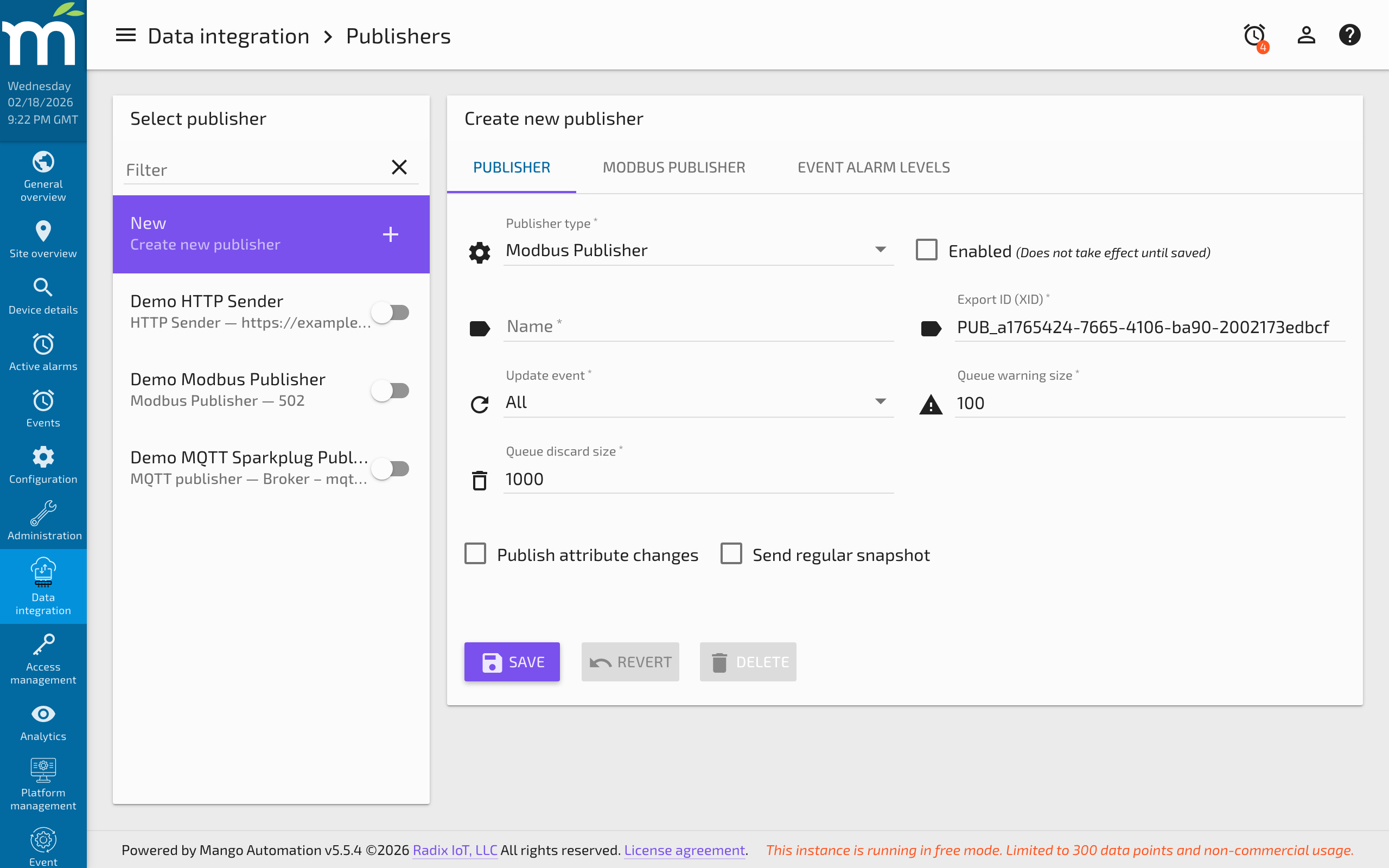
Creating a Publisher
To create a new publisher, navigate to Administration > Publishers and click New. Select the publisher type from the dropdown (HTTP Sender, MQTT Sparkplug, gRPC, etc.). Each publisher type has its own specific configuration, but all publishers share the common settings described below.
Common Publisher Settings
Every publisher, regardless of type, has the following configuration options:
Name
The Name is used to visually identify the publisher in lists and logs. It is recommended that each publisher have a unique name, but this is not enforced.
Enabled
The Enabled checkbox controls whether the publisher is actively distributing data. Disabling a publisher stops all data transmission and discards any queued data.
Queue Management
Publishers use internal queues to ensure that every point update is delivered to its destination. If the destination does not accept deliveries for an extended period (network outage, server downtime, etc.), the queue can grow very large.
Queue Warning Size
A Queue warning size can be configured to raise an alarm whenever the queue exceeds this threshold. The alarm returns to normal when the queue drops below 90% of the warning size, or when the publisher is disabled. This alerts operators to delivery problems before data loss occurs.
Queue Discard Size
To prevent memory exhaustion, the Queue discard size defines the maximum number of entries the queue can hold. When the queue exceeds this size, the oldest entries are discarded to make room for newer data. This ensures that if the destination is unavailable for an extended period, the most recent data is preserved while older data is dropped.
Entries are also discarded when the publisher is disabled.
Update Event
The Update event value controls which data point changes trigger a publish:
| Option | Behavior |
|---|---|
| All | Every point value update is published, even if the value has not changed. |
| Changes only | Only publish when the point's value actually changes (not just when it is updated with the same value). |
| Logged only | Only publish values that are also logged to the database. |
| None | Do not publish based on point updates (use snapshots instead). |
Choose the appropriate option based on your data volume and destination requirements. "Changes only" is commonly used to reduce bandwidth when the destination only needs to know about state changes.
Publish Attribute Changes
The Publish attribute changes checkbox determines whether changes to point attributes are published alongside value updates. Currently, only one attribute is supported in Mango: UNRELIABLE. This attribute is set when a value has not been reliably obtained by Mango (e.g., during a communication failure with the data source).
Regular Snapshots
The Send regular snapshot checkbox enables periodic publishing of the current value for each published point, regardless of whether the value has changed.
When enabled, the Snapshot send period defines how often snapshots are sent. This is useful for:
- Ensuring the destination always has a recent value, even for points that change infrequently.
- Providing periodic heartbeat data to confirm the connection is active.
- Meeting requirements for regulatory data reporting at fixed intervals.
Published Points
Each publisher has a list of data points that it publishes. The configuration of published points varies by publisher type, but generally includes:
- A reference to the Mango data point to publish.
- A key or identifier used by the destination system (e.g., a query parameter name for HTTP Sender, or a tag name for MQTT).
- Optional settings like whether to include timestamps.
To add points, navigate to the Data Points tab of the publisher and select the points you want to publish.
Publisher Types
Mango supports several publisher types, each designed for a different destination protocol:
| Publisher Type | Destination | Protocol |
|---|---|---|
| HTTP Sender | External URL | HTTP GET/POST |
| MQTT Sparkplug | MQTT Broker | MQTT v3 with Sparkplug |
| gRPC | gRPC Server | gRPC with mTLS |
| Slack Message | Slack Channel | Slack Bot API |
Best Practices
- Monitor queue sizes: Set the queue warning size to an appropriate level for your deployment. A growing queue usually indicates a connectivity or performance issue with the destination.
- Use "Changes only" when appropriate: This significantly reduces data volume for points that are polled frequently but change rarely.
- Enable regular snapshots for critical data: Even with "Changes only" mode, enabling snapshots ensures the destination receives periodic updates.
- Test with a small number of points first: Before publishing hundreds of points, verify the configuration with a small subset to ensure the destination is receiving data correctly.
- Plan for destination outages: Set the queue discard size large enough to buffer data during typical maintenance windows, but not so large that it risks Mango running out of memory.
Related Pages
- HTTP Sender Publisher — Send data point values to external URLs via HTTP GET or POST
- MQTT Sparkplug Publisher — Connect to MQTT brokers using the Sparkplug specification
- gRPC Publisher — Certificate management and PKI setup for secure gRPC data distribution
- Slack Message Event Handler — Send event notifications to Slack channels
- Data Point Properties Reference — Configure the data points that publishers distribute